


Quick Summary: Performance hosting is the safer choice for busy sites because it provides dedicated NVMe storage, LiteSpeed caching, and isolated resources that keep speeds steady during traffic spikes, while shared hosting throttles everyone on the server and often cracks under a few hundred simultaneous visitors. Cached pages can hide slowdowns, so test uncached pages and check TTFB above 600ms to confirm the server is the bottleneck before upgrading. Once you consistently pass 50,000 monthly pageviews or see peak-hour slowdowns, move to performance hosting like Talos Hosting’s NVMe and LiteSpeed setup, which also avoids renewal fees. Shared hosting only works if traffic stays low and speed isn’t critical.
When a post or campaign suddenly sends hundreds of visitors your way, performance hosting is the safer pick for fast hosting that stays steady under load. Shared hosting can still serve a mostly cached site well. The real question: are your slowdowns shared-resource limits or your site itself? This guide compares both under load, then gives you a testing checklist to choose fast hosting based on your actual workload.
Performance Hosting vs Shared Hosting: At a Glance
| Performance hosting | Shared hosting | |
|---|---|---|
| Resource model | Varies; may offer defined or dedicated allocations | Server resources shared across accounts |
| Speed under load | Can be more consistent when capacity matches demand | Can vary as demand approaches account or server limits |
| Best for | Growing, dynamic, or revenue-critical sites | Small sites and mostly cached workloads |
| Scalability | Depends on plan and provider architecture | Usually requires a plan upgrade as needs grow |
| Cost approach | Varies; often more than entry-level shared plans | Typically positioned as a lower-cost entry point |
How Performance hosting and Shared hosting Compare
Performance hosting
This is an umbrella term for plans tuned around speed, capacity, and responsiveness rather than the lowest price. It fits growing, dynamic, or revenue-critical sites that need fast hosting that stays quick when traffic spikes. Providers like Hostinger or RarHost shape this category in different ways, so resources and architecture vary by plan.
Shared hosting
Multiple accounts split the resources of one server, which keeps costs low and setup simple. It works well for small sites with mostly cached pages, where speed holds up until demand approaches account limits. Growth usually means upgrading to a bigger plan.
Key strengths
- Lowest entry price
- Simple to manage
Which Option Stays Faster When Traffic Picks Up?
Performance hosting. When 500 visitors hit at once, cached pages only go so far. A dedicated pool of CPU, RAM, and NVMe I/O keeps serving dynamic requests, while shared hosting throttles everyone on the box. Shared hosts often handle just a few hundred simultaneous visitors before slowdowns start.
A Cached Homepage Is Not the Whole Story
Caching hides the truth. Your homepage loads in half a second because the server serves a saved copy. Then someone opens the checkout page, a search, or a member area, and PHP runs on every request. That is where shared hosting cracks. Peak-hour neighbors slow your site too, even if your code is clean. Test those uncached pages before you judge a host.
Also Read: Performance Hosting: 9 Plans Built for Faster Pages
What You Get for the Extra Performance Headroom
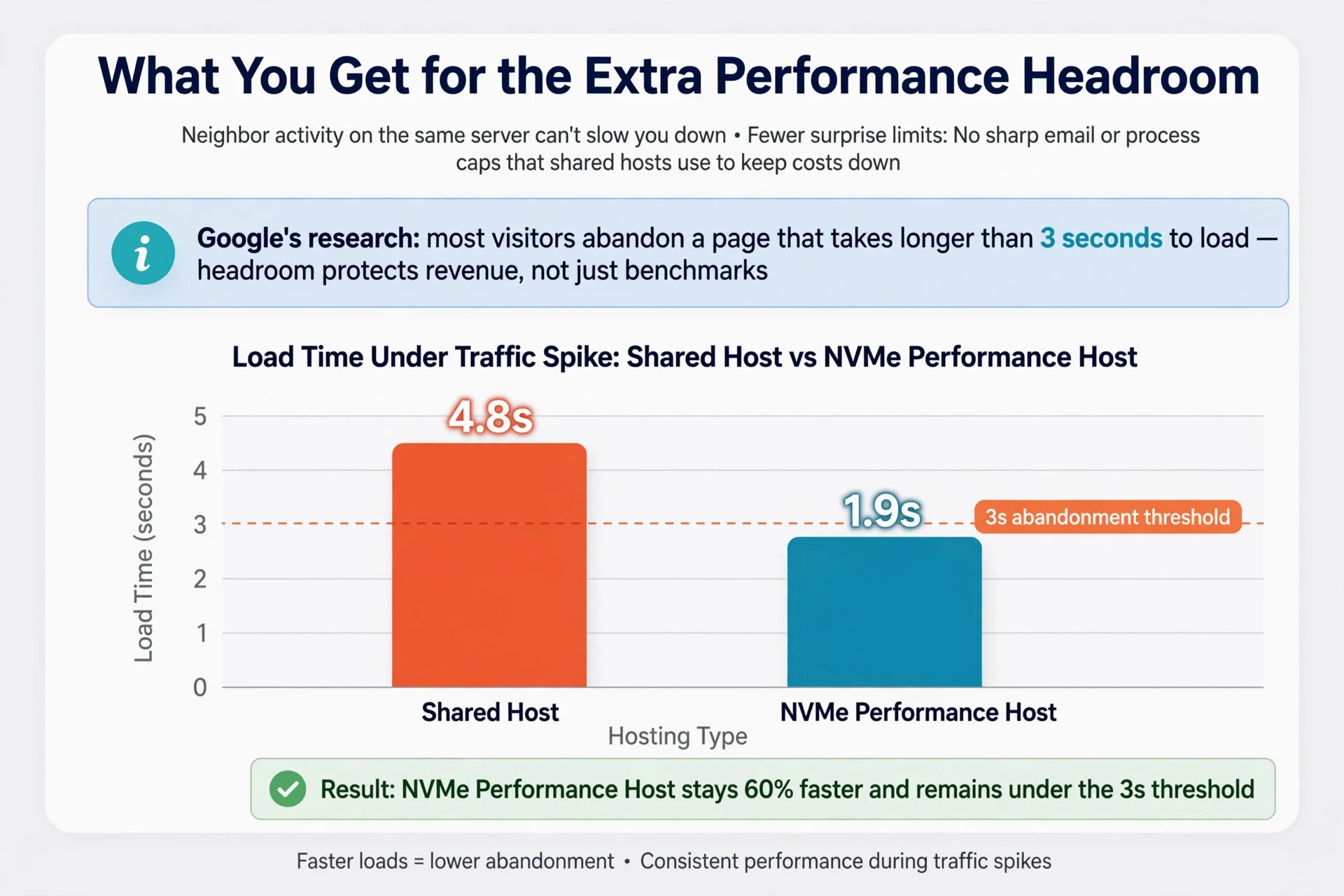
Paying for performance hosting buys you concrete things, not vague “speed upgrades.” Here’s what actually changes:
- Faster storage: NVMe SSDs move data several times quicker than the SATA drives most shared plans still use.
- Server-level caching: LiteSpeed and similar stacks serve cached pages without touching PHP, so traffic spikes don’t queue up.
- Isolated resources: Your CPU and RAM are reserved, so a noisy neighbor on the same server can’t slow you down.
- Fewer surprise limits: No sharp email or process caps that shared hosts use to keep costs down.
Google’s own research shows most visitors abandon a page that takes longer than three seconds to load, so headroom protects revenue, not just benchmarks.
At Talos Hosting, that stack (NVMe, LiteSpeed, US data centers) comes with no renewal fees, so the headroom you pay for stays yours.
When Should You Move Beyond Shared Hosting?
Your site slows down at rush hour, emails bounce, or your host warns you about resource limits. Those are signals, not flukes. Once you consistently pass 50,000 monthly pageviews, most shared environments start to buckle, especially when traffic comes in spikes rather than a steady drip.
Check the Bottleneck Before You Migrate
Confirm the server is the actual problem first. Run PageSpeed Insights and check Time to First Byte. If TTFB stays above 600ms even with caching configured, the shared environment is the bottleneck, not your site. That’s when plans built on dedicated NVMe resources, like Talos Hosting, earn their cost.

Which Should You Choose for a Busy Site?
Pick performance hosting if your site gets real traffic. Google found that as mobile load time grows from 1 to 10 seconds, the chance a visitor bounces jumps 123%, so shared hosting’s cramped servers cost you sales. Performance hosting – like Talos Hosting’s NVMe and LiteSpeed setup – handles traffic spikes without slowing down. Stick with shared hosting only if traffic stays low and speed is not critical.
Google’s mobile speed research

Your busy site deserves more than shared hosting can give. Talos Hosting delivers NVMe SSD speed and LiteSpeed power with no renewal fees. Switch today.
Frequently Asked Questions
Q1: Which performance host is fastest?
No single host wins for every site. Speed depends on NVMe storage, server caching, and traffic loads. Test hosts like Talos Hosting with real page data before committing.
Q2: When should I upgrade from shared hosting?
Upgrade when load times slow during peak traffic, CPU limits trigger warnings, or visitors start bouncing. Busy stores and content sites often hit this around consistent daily spikes.
Q3: Does LiteSpeed really make a difference?
Yes. LiteSpeed handles traffic spikes better than Apache and works with built-in caching. Combined with NVMe drives, it cuts load times noticeably without code changes.
Q4: Are lifetime hosting plans worth it?
They skip renewal fees, so costs drop over years. Check resource limits and support quality first to make sure the plan still fits your site long term.
Final Takeaway
Shared hosting works until real traffic hits. One 72-hour load test found shared setups slow sharply at p99. Measure your traffic, watch for 508 errors, and upgrade when benchmarks demand it – Talos Hosting’s NVMe and LiteSpeed platform makes that move smooth.





No Comment! Be the first one.